
Offline Transcription Software.
No Cloud. No Limits. No Fees.
ScribeForge is local transcription software — a desktop Whisper transcription app that turns unlimited audio & video into text in 100+ languages, entirely on your computer. One payment. Private forever.
Regular: $197 Founder Offer: $29 — Save $168
See ScribeForge In Action
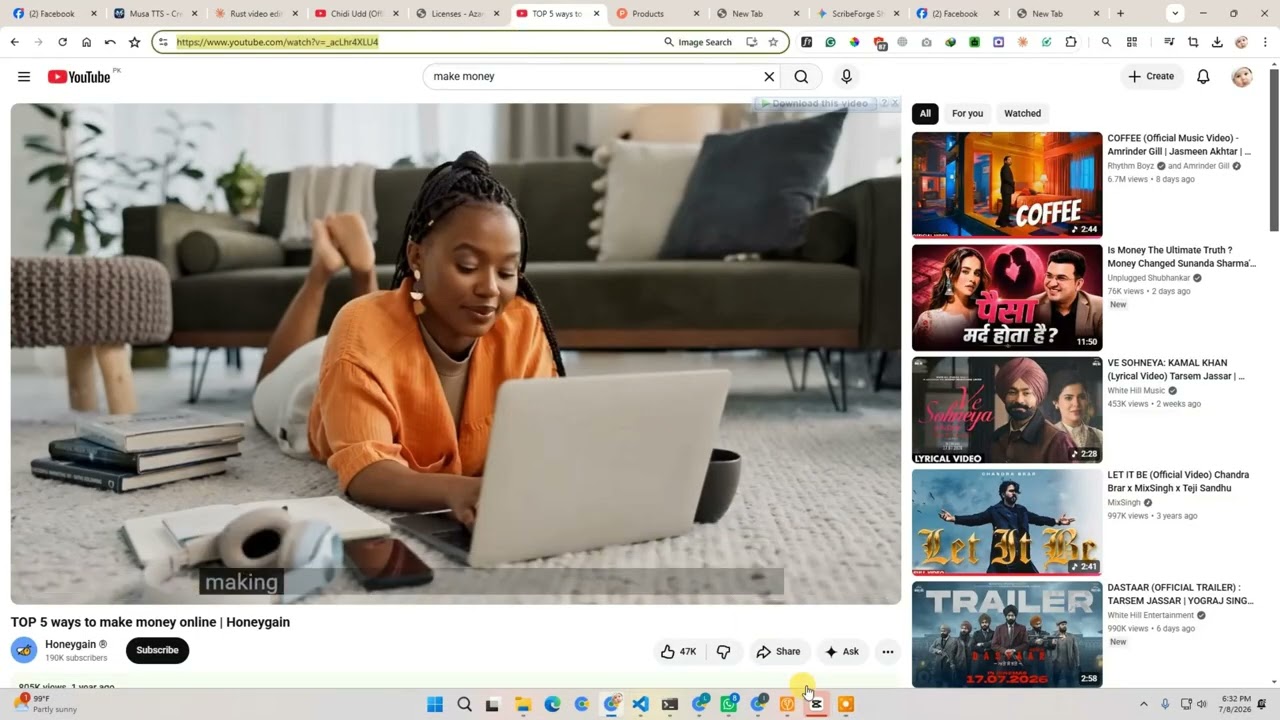
A quick walkthrough — drop a file, transcribe instantly, and run AI analysis, all 100% offline.
One App. Every Transcription Need.
Six ways to get audio into text — all running locally on your machine.
Drop Any File. Get Accurate Text.
Drag and drop audio or video files in any format — MP3, WAV, MP4, MKV, FLAC, and dozens more. ScribeForge processes everything locally with Whisper AI.
- All major audio/video formats
- No file size limits
- Speaker detection
- Export TXT, SRT, VTT, CSV, JSON
Paste a URL. Transcribe Instantly.
Paste any YouTube, Vimeo, or URL from 1,800+ sites. ScribeForge downloads the audio and transcribes automatically — one step.
- YouTube, Vimeo, Twitter, TikTok & more
- 1,800+ sites via yt-dlp
- Playlist & channel batch support
- Auto-download, no manual steps
Live Transcription from Your Mic.
Hit record and watch words appear in real-time — it keeps up with your speech, even on larger models. Perfect for meetings, interviews, lectures, and live events.
- Keeps pace with speech on larger models
- Works with more microphones
- Your last words before Stop are saved
- Saved with length, model & language
Batch Process Dozens at Once.
Drag files straight onto the queue, or add folders, playlists and channels. The model stays loaded between files, so batches finish faster.
- Drag & drop files onto the Batch page
- Faster — model stays loaded between files
- Links keep the video's real title
- Save projects & export all at once
Drop Files in a Folder. Transcripts Appear.
Point Watch Folder at any folder — a recorder's sync folder, a Zoom export, a shared drive. Every new recording is transcribed automatically, one at a time, so your computer stays responsive.
- Waits until a file has finished copying
- Keeps running while you use other pages
- Restarts when you reopen ScribeForge
- Live activity: queued, copying, progress
Let Your Apps Transcribe Locally.
The built-in Local API lets scripts, n8n workflows and other apps on your computer send audio, video or a link to ScribeForge and get the transcript back. Apps built for OpenAI's speech-to-text just need a new address.
- OpenAI-compatible endpoint
- Text, SRT, VTT or JSON with timestamps
- Local-only, protected by your private key
- No per-minute fees, ever
# Transcribe locally — no cloud
curl 127.0.0.1:47800/v1/audio/transcriptions \
  -H "Authorization: Bearer KEY" \
  -F "file=@meeting.mp3" \
  -F "response_format=srt"

1
00:00:01,000 --> 00:00:04,200
Welcome, everyone. Let's get started.
A Closer Look at What You Get
Explore the tools professionals rely on every day to transcribe faster.
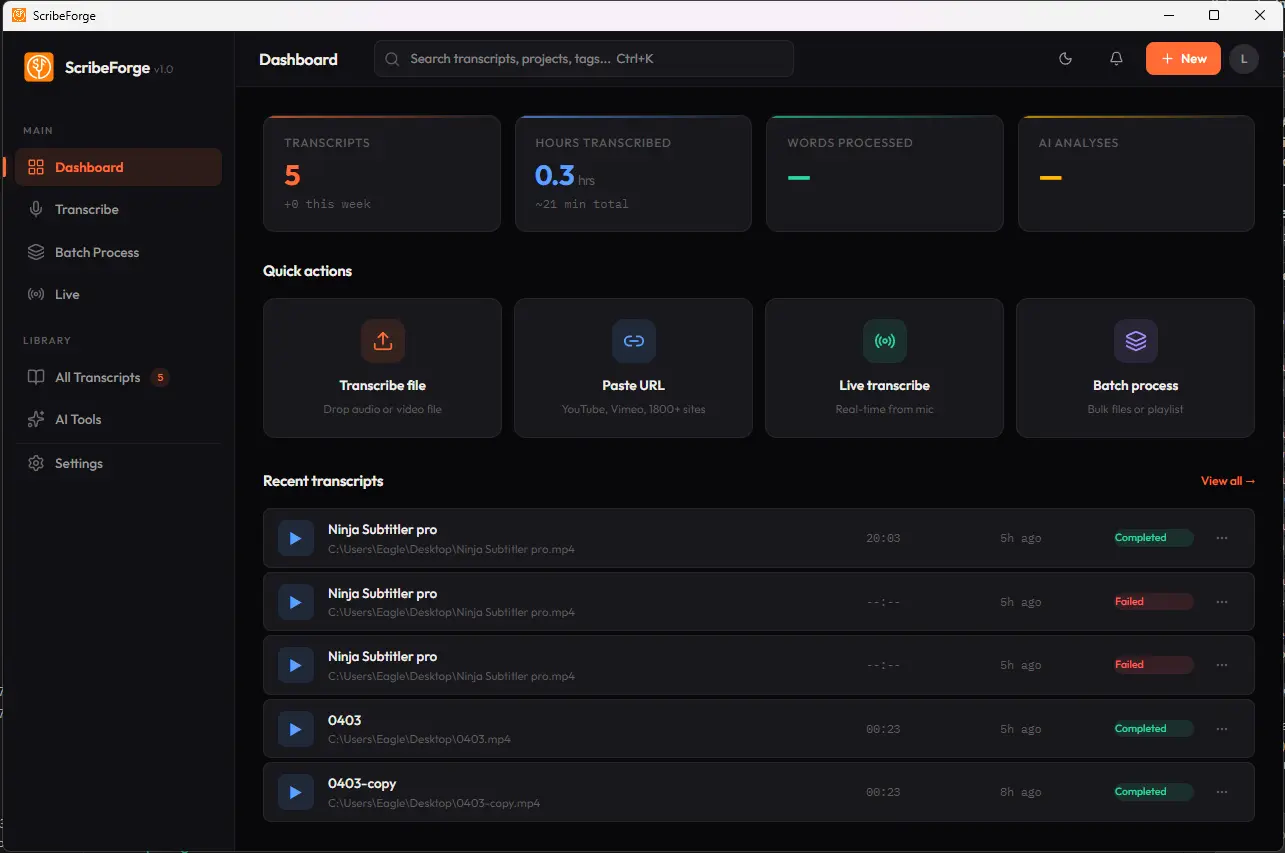
The ScribeForge dashboard — your command center for all transcriptions
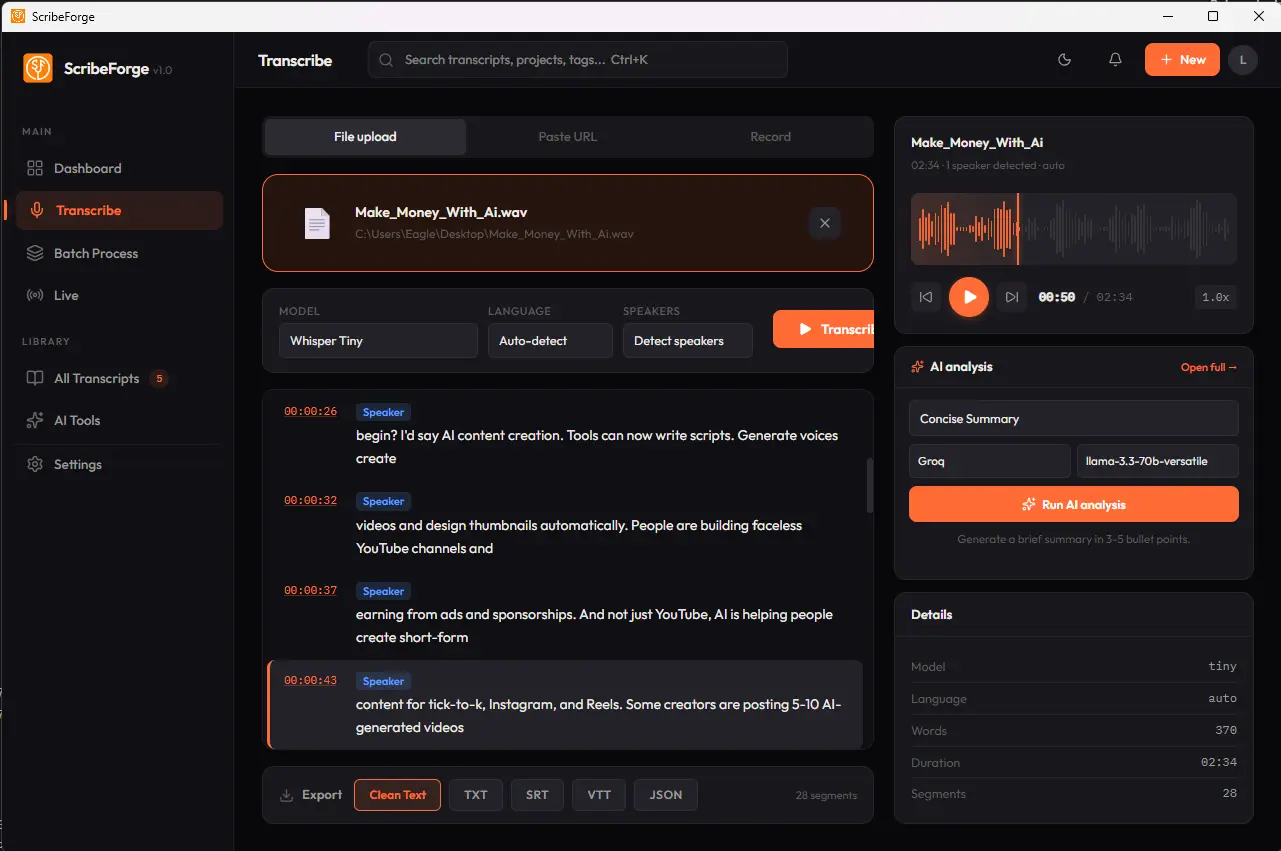
Drop Any File. Get Accurate Text.
Drag and drop audio or video files. Whisper AI processes them locally — no uploads, no cloud, no waiting. Supports MP3, WAV, MP4, MKV, FLAC, and dozens more.
- All major audio/video formats
- No file size or duration limits
- Automatic speaker detection
- Export TXT, SRT, VTT, CSV, JSON
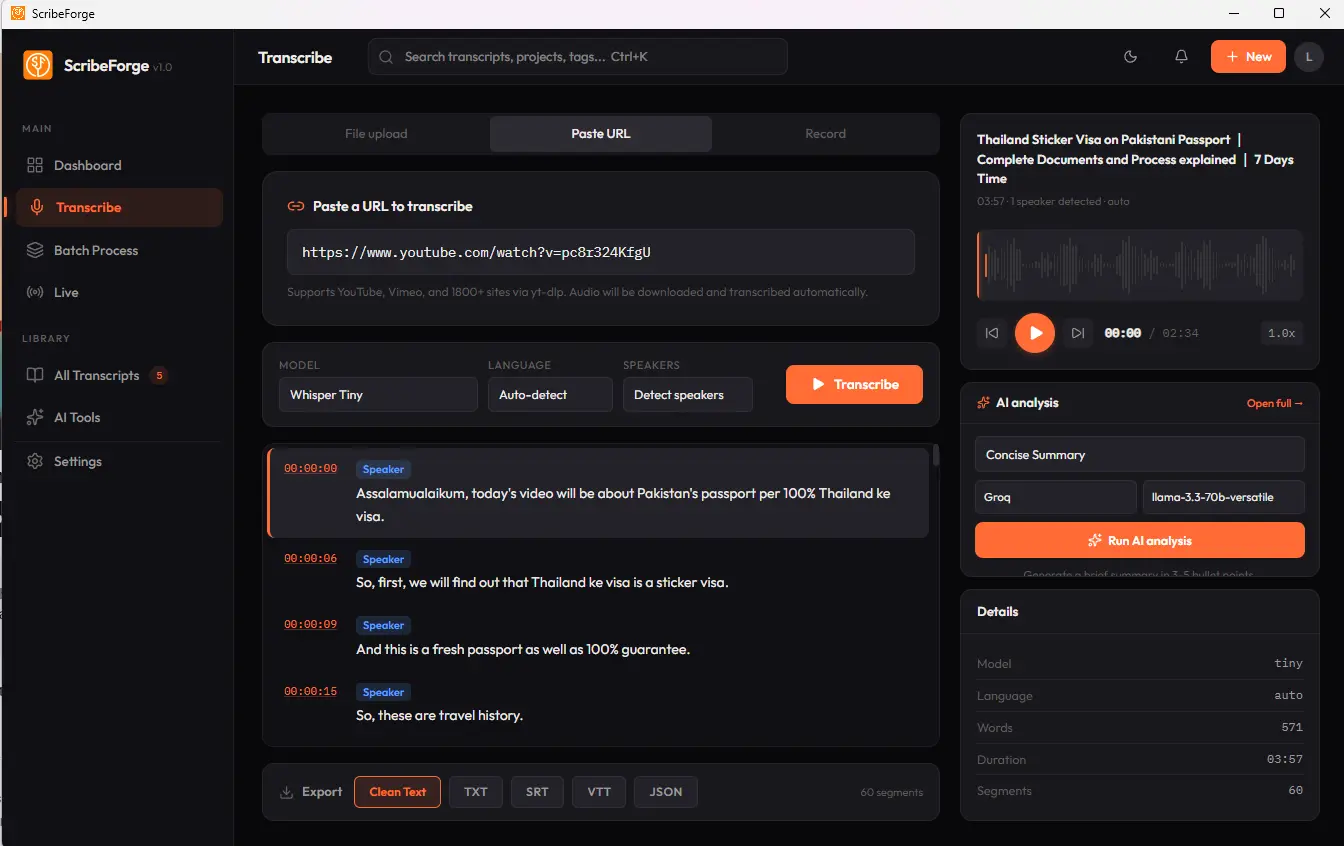
Paste a Link. Transcribe Instantly.
Paste any YouTube, Vimeo, or URL from 1,800+ sites. ScribeForge downloads the audio and transcribes it — all in one step. Supports entire playlists.
- 1,800+ sites via yt-dlp
- YouTube, Vimeo, Twitter, TikTok & more
- Batch download playlists & channels
- Auto-extracts audio, zero manual steps
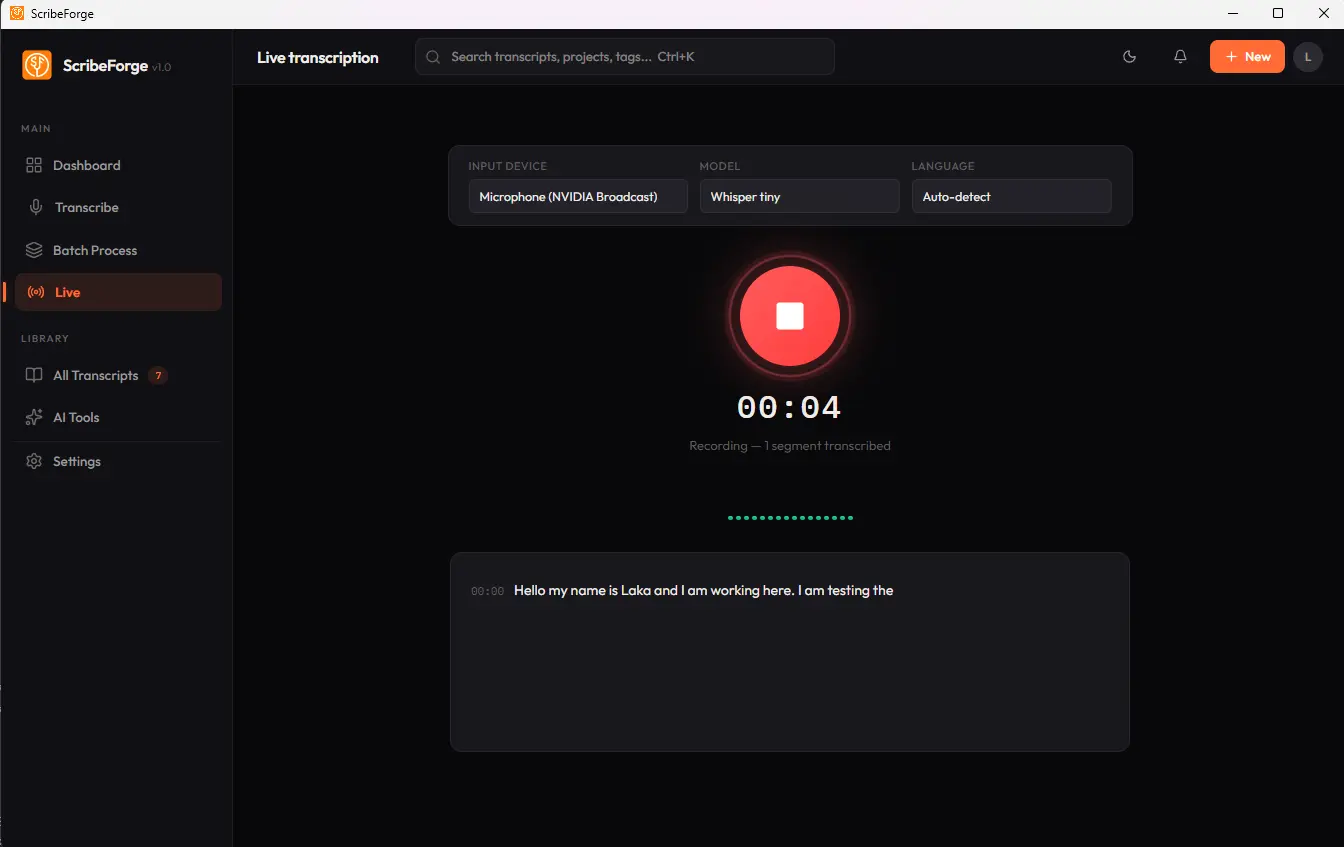
Real-Time from Your Microphone.
Click record and watch words appear as you speak — it keeps up even with larger models. Leave the page mid-recording and it's still there when you come back. All processed locally.
- Real-time speech-to-text in the language you choose
- Works with more mics and headsets
- The last words before Stop are always saved
- Length, model & language saved to your library
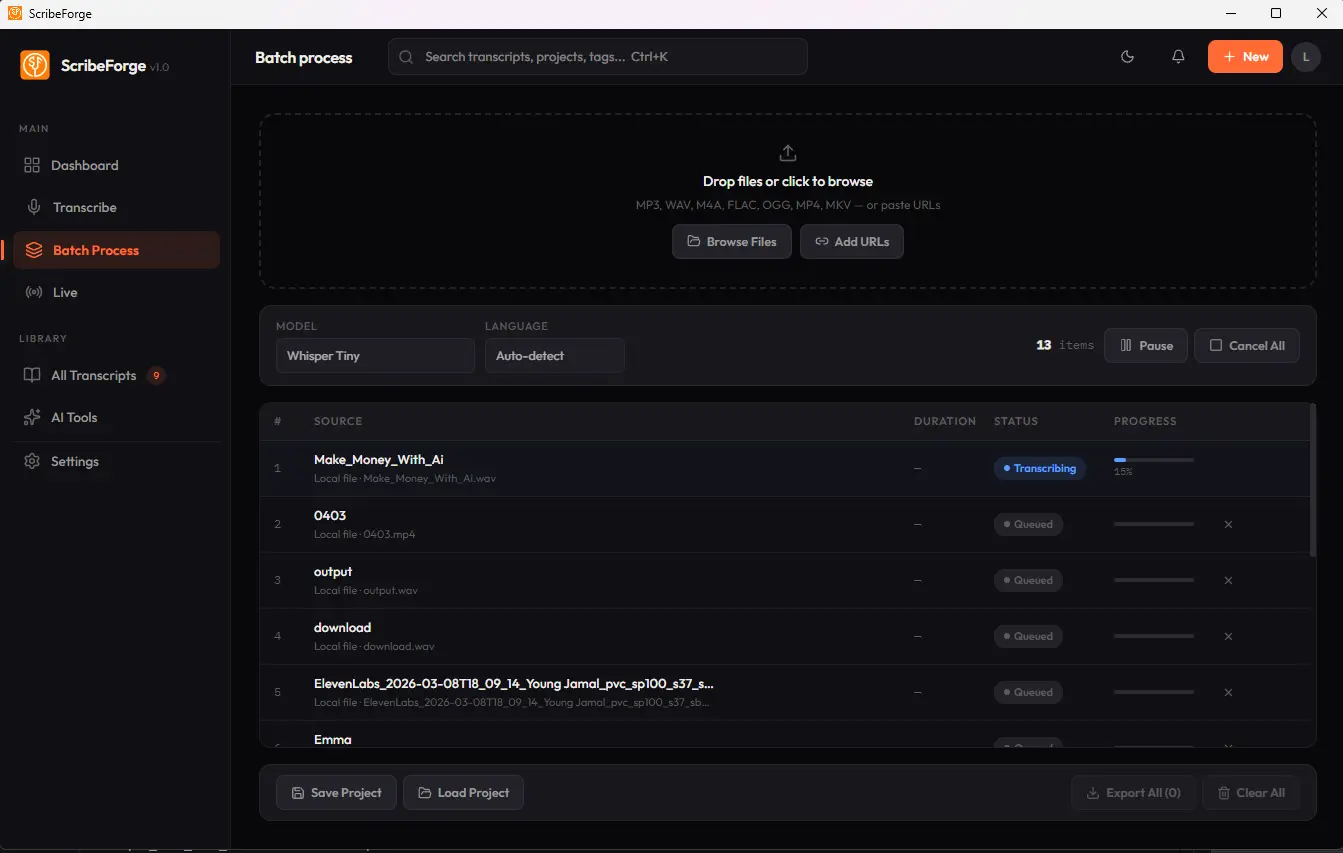
Process Dozens of Files at Once.
Drag files straight onto the queue, or add folders, playlists and channels. The model stays loaded between files for faster runs, and Cancel All stops everything at once. No limits on queue size.
- Drag & drop files and entire folders
- YouTube playlists keep their real video titles
- Save projects — re-saving updates, no duplicates
- Export all transcripts at once
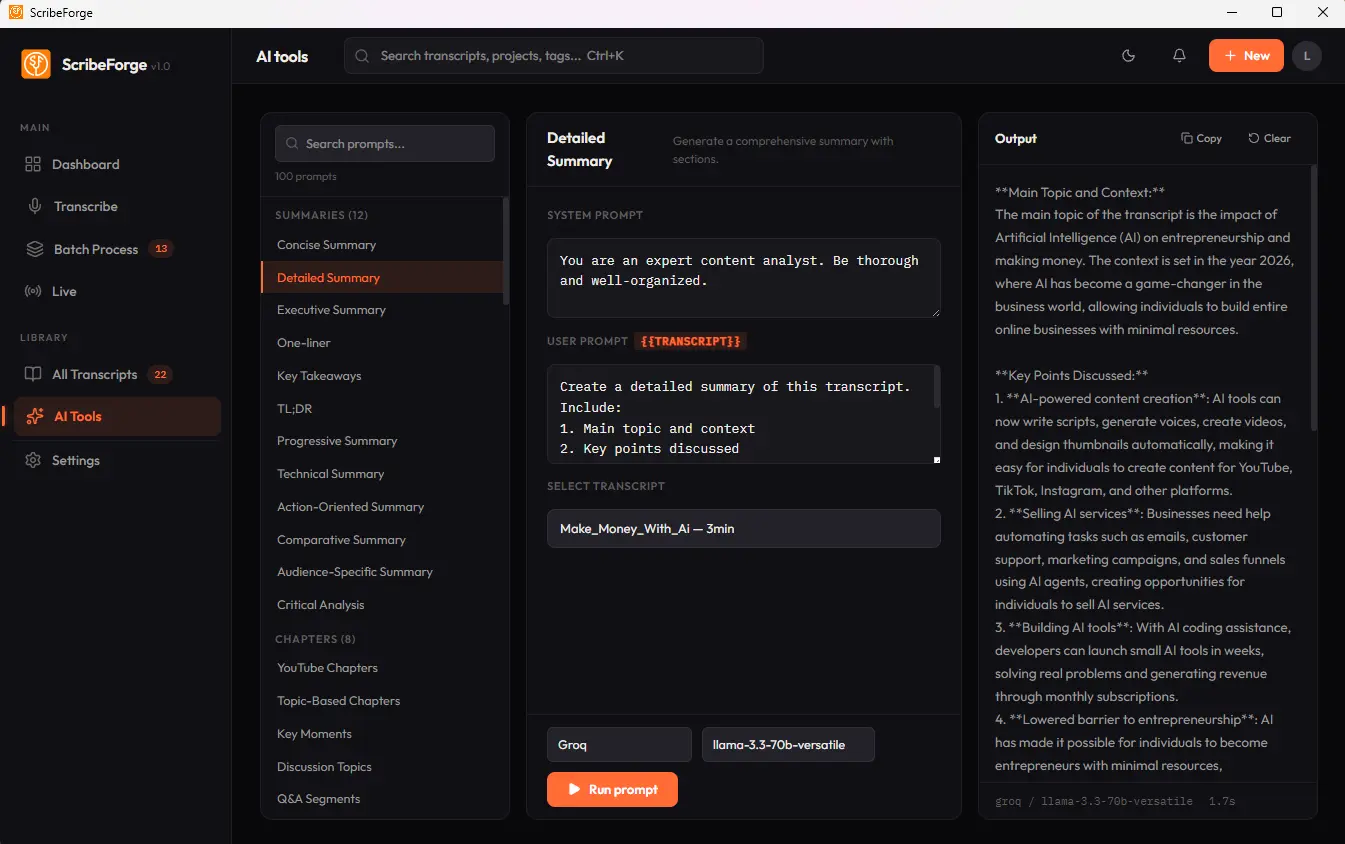
80+ AI Prompts Built In. Free.
Summarize, extract action items, generate timestamps, create blog posts, translate — all with one click. Uses a free local AI model, no API keys needed.
- Smart summaries of any recording
- Extract key points & action items
- Generate YouTube timestamps
- Create blog posts from transcripts
Your Own Whisper API. No Cloud Bill.
Turn ScribeForge into a private transcription server for your scripts, automations and apps. It speaks the same language as OpenAI's speech-to-text, accepts files or video links, and saves every result to your library.
- One click to start — restarts with the app
- Ready-made PowerShell, cURL, Python, Node.js & n8n examples
- "Try it now" buttons test your setup in seconds
- Requests queue up, so your PC stays responsive
127.0.0.1:47800Cleaner Transcripts. Nothing Left Behind.
ScribeForge does more than run a model. It fixes the problems that make long recordings unreliable — on the Transcribe page, Batch, Watch Folder and the Local API.
Recovers speech the model skipped
When a Whisper model skips part of the speech, ScribeForge goes back and transcribes that part again. In a 1-hour test, this recovered 48 seconds that would otherwise have been missing.
No Repeat Loops
One misheard sentence can't repeat to the end of a long recording anymore — the rest of your audio is kept.
Skips Silence & Music
A tiny 1 MB helper filters quiet parts and music first, removing most made-up text. Works without it offline.
Best Wording Wins
Whisper checks several possible wordings and keeps the best one, for more accurate transcripts.
Stutter Cleanup
"Why why why why…" becomes one word, the rest of the sentence stays — and short replies like "Thank you" are kept.
Parakeet, Refined
Parakeet splits audio only at pauses and writes real sentences with accurate timestamps — no cut or doubled words.
Instant Cancel
Cancel stops a transcription in about a second, instead of waiting for the whole file to finish.
Transcribing Urdu? Choose Whisper Large V3 Turbo — it gave the clearest, most complete transcript of a 1-hour Urdu class in our tests.
Why ScribeForge Over Cloud Tools?
Not Just Transcription. AI Analysis Built In.
80+ AI prompts to analyze, summarize, and transform your transcripts.
Smart Summaries
Get concise summaries of hours-long recordings in seconds.
Action Items
Extract action items, decisions, and follow-ups from meetings.
Timestamps
Generate chapter timestamps for YouTube, podcasts, or any player.
Blog Generator
Turn any transcript into formatted blog posts or articles.
Translation
Transcribe in one language, get AI translation to another.
Multi-Format Export
TXT, SRT subtitles, VTT, CSV, JSON — ready for any workflow.
Popular Ways to Transcribe
Offline Transcription
Private, local speech-to-text — no uploads, no internet required.
🎧Audio to Text
Convert any audio file into an accurate, editable transcript.
🎥Video to Text
Extract text and subtitles from MP4, MKV and other video files.
▶️YouTube to Text
Paste a link and get a transcript, captions and chapters.
🧠Whisper Transcription
See how ScribeForge runs OpenAI Whisper 100% locally.
🎁Free Transcription
Download free and transcribe locally — no credit card needed.
Built for Every Professional
YouTube Subtitles
Generate SRT files. Boost SEO and reach global audiences.
🎙️Podcast Notes
Auto-generate show notes, timestamps, and summaries.
📋Meeting Minutes
Never miss an action item with speaker labels.
🎓Lectures
Convert lectures into searchable, studyable text.
🔍Research
Transcribe interviews, extract themes and insights.
⚖️Legal
Depositions, hearings — all private, all local.
Audio to Text in 3 Steps
Drop, Paste, Record or Connect
Drag a file, paste a URL, record live, watch a folder, or send it from your own app.
AI Transcribes Locally
Whisper processes on your machine. No data uploaded.
Export & Analyze
Get any format. Use 80+ AI tools to summarize and create.
What Users Say
"Replaced three subscriptions. The batch processing alone saves me hours every week."
"Processing dozens of episodes weekly with no per-minute fees. One payment and I'm set for life. The AI summary feature is game-changing."
"The privacy aspect sold me. Our legal team needed transcription that doesn't send data to the cloud."
Common Questions
How accurate is ScribeForge?
It runs OpenAI's Whisper and NVIDIA Parakeet models locally — near-human accuracy for clear audio. ScribeForge also skips silence and music, re-checks any speech a model skipped, and stops long recordings from getting stuck repeating a phrase.
Does it really work 100% offline?
Yes. After initial setup, all processing is local. Files never leave your machine.
Can I transcribe audio to text for free?
Yes — ScribeForge has a free tier. Download the desktop app and transcribe audio to text free, then upgrade for unlimited use.
Can I transcribe YouTube videos on my desktop?
Yes. ScribeForge is a desktop app for Windows and macOS — drop in any downloaded YouTube video or audio file for fast, local transcription.
Is this a one-time payment?
Yes. ScribeForge is transcription software with a one-time payment — pay once and own it forever, with no monthly subscriptions or per-minute fees.
What formats are supported?
MP3, WAV, MP4, MKV, AVI, FLAC, OGG, WebM, and dozens more.
Any file size or duration limits?
On paid plans, no limits — transcribe 30-second clips or 12-hour podcasts with no caps or quotas. The free tier is capped at 15-minute files and 5 hours per month.
Do I need a powerful computer?
Any modern computer with 8GB+ RAM. No GPU required. Apple Silicon gets best performance.
What are the AI analysis tools?
80+ built-in prompts: summarize, extract key points, timestamps, blog posts, action items, and more. Included on every paid plan.
Which AI models can I use for analysis?
A free local model, or your own key for OpenAI (GPT-6 Luna, GPT-6 Sol, GPT-5.6 Luna), Google Gemini (3.1 Flash-Lite — free to use — 3.5 Flash-Lite, 3.8 Flash, 3.1 Pro preview) or Groq (GPT-OSS 120B and 20B).
Can my other apps or automations use ScribeForge?
Yes. The built-in Local API is compatible with OpenAI's speech-to-text, so scripts, n8n workflows and other apps on your computer can send audio, video or a video link and get the transcript back — privately, with no per-minute fees. Included on every paid plan.
Can ScribeForge transcribe new files automatically?
Yes. Point Watch Folder at any folder and every recording dropped into it is transcribed one at a time. It waits until a file finishes copying, keeps running while you use other pages, and starts again when you reopen the app.
Stop Paying Monthly for Transcription.
Unlimited transcription, AI tools, batch & watch folders, a local API, complete privacy — one payment, forever.
Regular: $197 Founder Offer: $29 Save $168